

A recruiter capacity model converts available recruiter hours and weighted requisition load into a single diagnostic that shows whether you should hire, redistribute, or automate. The core formula is simple: divide weighted requisition load by sustainable capacity. Run it today on one recruiter or one team, and you'll know within minutes whether the strain you're feeling has a number behind it.
TL;DR:
- Most teams underestimate the impact of requisition complexity, requiring weighted scores to accurately measure recruiting workload against capacity.
- Recalibrating role weights every two quarters ensures the model stays aligned with shifting market conditions and hiring dynamics.
- Automating sourcing and screening can reclaim 30 to 40 percent of recruiter hours on low-complexity requisitions, reducing the need for new hires.
- Redistributing reqs to underutilized team members or supporting recruiters with coordinators often solves capacity issues faster and cheaper than hiring.
- Building dynamic scenario models that incorporate hiring plans and attrition, and comparing them with peer benchmarks, improves headcount decision accuracy.
Table of Contents
- What Is a Recruiter Capacity Model?
- How Do You Calculate Recruiter Capacity and Weighted Requisition Load?
- How Do You Weight Requisitions by Role Complexity?
- What Is a Sustainable Recruiter Workload by Role Type?
- How Do You Build Scenario Models for Recruiter Capacity?
- Should You Hire, Redistribute, Automate, or Add Coordinator Support?
- Where Should You Get Data to Build the Model?
- A Talent Leader's Take on Capacity Models
- Put the Model to Work With Peer Benchmarking
- Tools and Reports to Run the Model Yourself
- Sources
What Is a Recruiter Capacity Model?
A recruiter capacity model is a structured way to measure how much recruiting work a person or team can sustainably handle against how much work they're actually carrying. It converts vague complaints like "we're stretched thin" into a number you can act on. But that number only means something if you separate four terms that get used interchangeably and shouldn't be.
Capacity is the sustainable amount of recruiting work a recruiter can handle in a defined period without a meaningful drop in speed, quality, or candidate experience. It's not the maximum they can survive during a crunch; it's what they can hold week after week. Workload is the actual volume of work assigned right now, measured in open requisitions or weighted units. Utilization is workload divided by capacity, expressed as a percentage. Productivity (often tracked as throughput or time to fill) measures output, like hires per month or average days to close a req.
Counting open requisitions alone tells you almost nothing, because a healthy req and a hard-to-fill req consume wildly different amounts of recruiter time. A recruiter carrying 10 corporate reqs might be under less strain than one carrying 6 specialized engineering searches. That's why every credible model weights requisitions by complexity before comparing load to capacity.
The formulas that anchor the rest of this article:
- Available capacity = working hours × % time spent recruiting
- Weighted requisition load = sum of (each req × its complexity weight)
- Utilization = weighted requisition load ÷ available capacity
- Capacity gap = weighted requisition load − available capacity
Recruiter capacity planning built on these four terms gives you a shared vocabulary across TA leadership, finance, and hiring managers. Without it, "we need more recruiters" becomes a subjective argument instead of a modeled conclusion.
How Do You Calculate Recruiter Capacity and Weighted Requisition Load?
The model runs in five steps, and each one uses data most talent acquisition teams already have sitting in their applicant tracking system or timesheets.
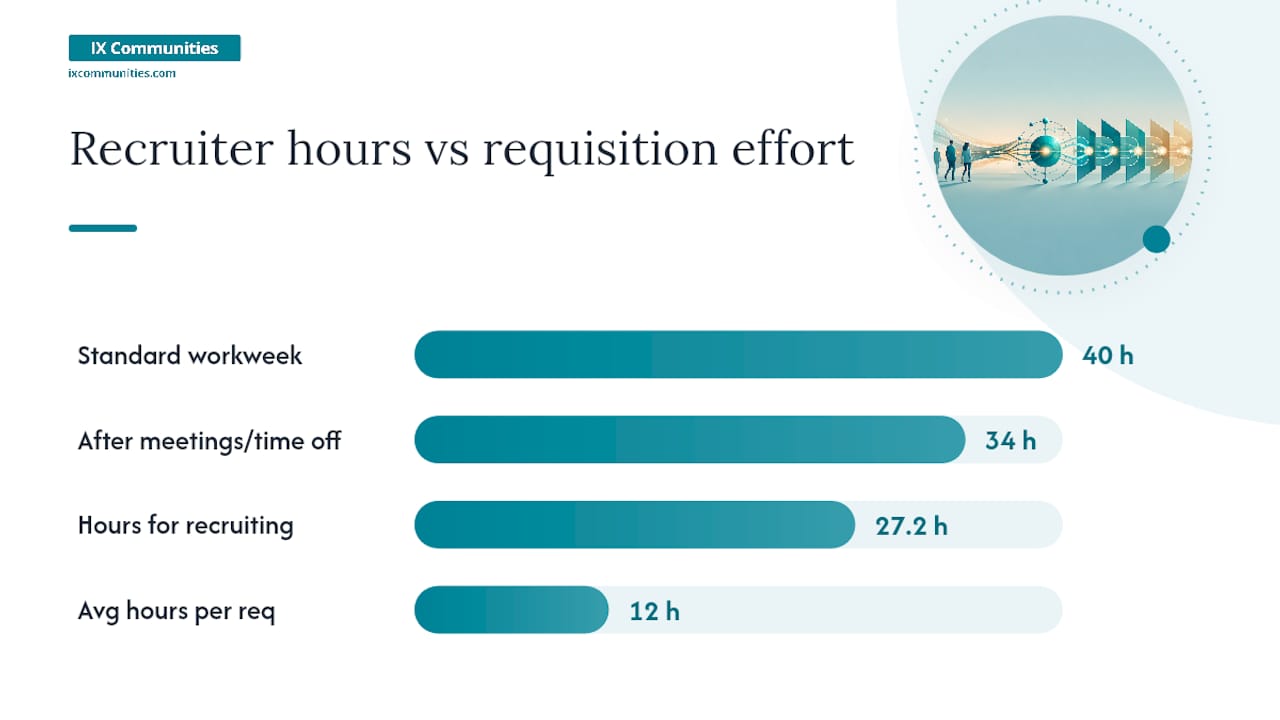
- Calculate gross available hours. Start with a standard workweek (40 hours), subtract time off, holidays, internal meetings, and administrative work unrelated to filling reqs. A recruiter working a 40 hour week who loses 6 hours to internal meetings and reporting has 34 gross hours left.
- Determine percent time on recruiting. Few recruiters spend 100% of their time on requisition work. Sourcers, coordinators, and generalists split time across employer branding, intake calls, and reporting. If a recruiter spends 80% of remaining hours on active recruiting, available recruiter hours drop to roughly 27.2 hours per week.
- Estimate average hours per requisition. Pull this from historical ATS data rather than guessing. If a recruiter closed 20 standard reqs last quarter and logged 240 hours against them, that's 12 hours per req on average.
- Assign complexity weights and sum the load. A standard req might carry a weight of 1.0, while a specialized or executive search might carry 1.8 to 2.5 (the weighting framework below covers this in detail). Multiply each open req by its weight, then sum.
- Compare weighted load to available capacity. Divide total weighted load by available hours to get a utilization percentage.
Here's a worked example for one corporate recruiter:
This is the exact structure capacity calculators use under the hood, whether they model hours available, percent time recruiting, or role complexity. The Ninjahire capacity planning framework follows the same seven-step logic: available hours in, weighted load out, utilization as the diagnostic in the middle.
How Do You Weight Requisitions by Role Complexity?
Not every requisition costs the same in recruiter time, and pretending otherwise is the single most common flaw in homegrown capacity spreadsheets. A weighting scale fixes that by assigning a multiplier to each req category based on how much sourcing, screening, and stakeholder coordination it actually demands.
These weights are illustrative starting points, not fixed law. Calibrate them against your own historical data: pull average hours-to-fill by role category over the last two or three quarters, normalize to your "moderate" baseline of 1.0, and adjust the rest proportionally.
A quick mini-example: a recruiter carrying 4 moderate reqs (1.0 each), 2 specialized reqs (1.6 each), and 1 executive search (2.4) has a weighted load of 4 + 3.2 + 2.4 = 9.6 weighted units, not the "7 open reqs" a headcount report would show. That gap between raw req count and weighted load is usually where the disconnect between recruiter complaints and leadership skepticism lives.
Pro Tip: Recalibrate weights every two quarters, not once a year. Applicant flow, hiring manager responsiveness, and market conditions shift fast enough that a weight set in January can be stale by summer.
What Is a Sustainable Recruiter Workload by Role Type?
Published benchmarks are useful only when you understand what's baked into them. Broad averages hide massive variance between a corporate generalist and a technical full-cycle recruiter, and applying one number across your whole team will send you chasing the wrong fix.
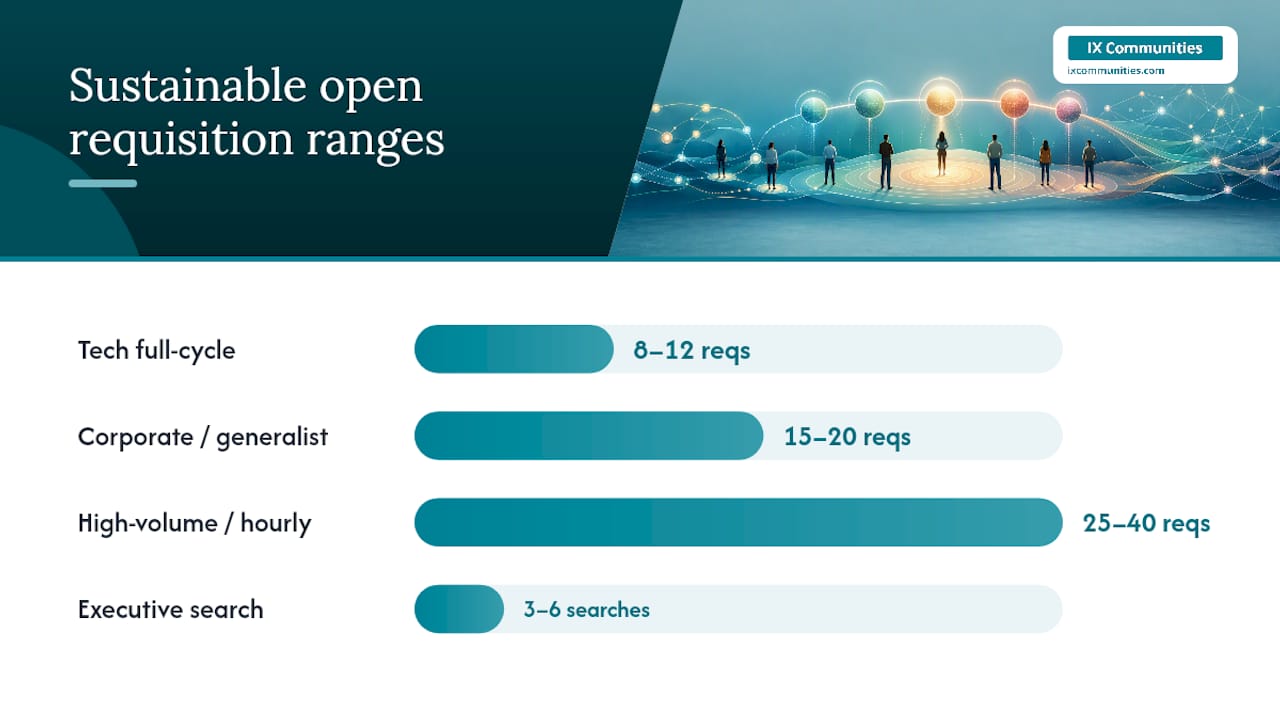
Recent ATS-measured benchmarking puts the average open requisition load at roughly 14 reqs per recruiter, but sustainable ranges vary sharply by role type:
- Tech full-cycle recruiting: 8 to 12 open reqs, given longer sourcing cycles and technical screening.
- Corporate/general business roles: 15 to 20 open reqs, with faster applicant flow and more templated processes.
- High-volume/hourly recruiting: 25 to 40 open reqs, supported by high applicant volume and simplified screening.
- Coordinators supporting recruiters: capacity measured in support ratio rather than reqs, typically 1 coordinator per 3 to 5 full-cycle recruiters.
- Executive search: 3 to 6 concurrent searches, reflecting confidential, multi-stakeholder processes.
Four variables explain most of the spread within each range: team size, applicant volume per req, tooling maturity, and hiring manager responsiveness. A recruiter with a slow-responding hiring manager burns hours on follow-up and status calls that never show up in a simple req count. Benchmarks also need to be read against applicant volume specifically, since the same req count can represent very different amounts of actual work depending on how many qualified applicants flow through the top of funnel.
Coordinator and tooling support change these ranges materially. Adding dedicated coordinator support can increase a recruiter's effective capacity by an estimated 30 to 40%, largely by removing scheduling and administrative drag. Automation aimed at sourcing and screening can reclaim a comparable amount of time in some team setups, according to the same benchmarking data, freeing recruiters to spend more of their week on the parts of the job a tool can't do: candidate conversations and hiring manager alignment.
How Do You Build Scenario Models for Recruiter Capacity?
A capacity model earns real credibility with finance when it stops being a single static number and starts producing scenarios. Build three: conservative, likely, and aggressive, each with its own hiring volume, attrition, and complexity assumptions.
- Conservative scenario: assume current hiring velocity holds flat, no new headcount is added mid-year, and req complexity mix stays where it is today.
- Likely scenario: layer in your actual approved headcount plan, typical seasonal req spikes, and a modest increase in specialized or hard-to-fill roles.
- Aggressive scenario: model an accelerated hiring plan, such as a new product launch or market expansion, alongside higher attrition risk on the recruiting team itself.
Each scenario needs the same three inputs adjusted up or down: expected req volume, complexity mix, and recruiter attrition. Mid-cycle additions matter most here. If your likely scenario assumes two new recruiters join in month four, model utilization both before and after that start date, since onboarding time usually means a new recruiter operates below full capacity for the first several weeks.
For every scenario, produce the same three outputs so leadership can compare them side by side:
- Recruiters needed to hold utilization at a sustainable level
- Expected timeline to close the resulting gap (hire, train, ramp)
- Cost alternatives, such as the price of a coordinator hire versus a full recruiter versus contract sourcing support
Teams that pull this from dynamic ATS data rather than static spreadsheets tend to have smoother headcount conversations with finance, mostly because the model updates itself monthly instead of going stale the week after it's built. That single shift, from a one-time spreadsheet to a living model, is often what separates a capacity request that gets approved from one that gets tabled.
Should You Hire, Redistribute, Automate, or Add Coordinator Support?
Once your model shows a capacity gap, the instinct is to request a new recruiter. That's frequently the most expensive and slowest lever available, and it's rarely the first one you should pull.
Run the gap through four levers before deciding:
- Redistribute: shift reqs from an overloaded recruiter to one running below 85% utilization. Fastest fix, zero cost, works only when slack actually exists elsewhere on the team.
- Automate: apply sourcing or screening automation to the highest-volume, lowest-complexity reqs first. Moderate implementation effort, meaningful hour recovery on standard reqs, limited effect on specialized or executive searches.
- Add coordinator support: bring in coordinator capacity to absorb scheduling, intake logistics, and reporting. Strong ROI when coordinator salary sits well below recruiter salary and the gap is driven by administrative drag rather than sourcing volume.
- Hire a recruiter: justified when the gap is sustained across a rolling 12 week window, redistribution has no slack to draw on, and the complexity mix can't be automated away.
Pro Tip: Compare loaded coordinator salary against the hours-per-week you'd reclaim before comparing it to a recruiter hire. If coordinator support recovers 8 to 10 hours weekly across three recruiters, that often beats the cost and ramp time of a new hire outright.
Whichever lever you pull, monitor utilization percentage, time to fill by weighted category, and offer acceptance rate for the following two to three cycles. A lever that fixes utilization but tanks acceptance rate hasn't actually solved anything.
Where Should You Get Data to Build the Model?
A capacity model is only as credible as the inputs behind it, and most of what you need already lives inside systems your team touches daily.
Pull these internal inputs first:
- ATS fields for req open date, close date, and stage-by-stage timestamps
- Recruiter time logs or calendar data showing hours spent by activity type
- Intake meeting cadence and hiring manager response times per req
- Historical hires-per-recruiter and average hours-per-req by role category
Layer in pipeline pass-through and offer-acceptance data, since these variables shift hours-per-req substantially even when req volume stays flat.
External benchmark reports help you sanity-check your internal numbers against a broader market, but they shouldn't override what your own historical data says. Use them to flag when your assumptions look unusually high or low, then dig into why.
This is where peer benchmarking adds something a published report can't: context from teams facing your exact constraints. Ixcommunities exists for exactly that conversation, giving talent acquisition leaders a place to compare weighting assumptions, sustainable ranges, and scenario outputs with peers running similar-sized teams, rather than guessing whether your numbers are reasonable in isolation.
A Talent Leader's Take on Capacity Models
The actual problem wasn't headcount. Redistribution fixed it in a week, at zero cost.
The mistake I see most often isn't skipping the math. It's building the model once, getting an answer, and never rerunning it. Req mix shifts, hiring managers get slower or faster, and a weight set that was accurate in Q1 quietly stops being accurate by Q3.
A short checklist worth keeping on hand: don't count raw reqs without weighting them. Don't treat one bad week as a hiring signal. Don't skip the redistribution and automation levers just because a new hire feels like the "real" fix. And don't build the model in isolation. Comparing your ranges against what peer teams are actually seeing is how you catch a bad assumption before it turns into a bad headcount request.
— Simon
Put the Model to Work With Peer Benchmarking
Building a capacity model is one thing. Trusting the weights, ranges, and scenario outputs you land on is another, and that's the gap Ixcommunities is built to close. Instead of guessing whether your utilization targets or complexity weights are reasonable, you compare them directly with talent acquisition leaders running teams at a similar scale, in a secure peer environment built for that exact conversation.
Membership gives you access to market benchmarking reports that go deeper than public averages, peer calls where you can pressure-test your scenario assumptions against real teams, recruiter training courses, and guidebooks that turn a one-time capacity exercise into a repeatable practice. It's built for heads of talent acquisition, executive recruiting, and diversity recruiting at mid to large companies, not individual recruiters or small teams without a dedicated TA function.
If your capacity model just surfaced a gap you're not sure how to solve, visit the Ixcommunities membership page to see how peer benchmarking and training fit into your next planning cycle.
Tools and Reports to Run the Model Yourself
A few resources are worth bookmarking alongside the framework above.
The Recruiter Capacity Model & Calculator from Intervue lets you plug in hours available, percent time recruiting, and role complexity to generate reqs-per-recruiter or recruiters-needed outputs directly.
The Recruiter Capacity Benchmarks report breaks down sustainable load ranges by role type and quantifies how coordinator support and automation shift effective capacity.
The Ninjahire capacity planning framework walks through the full seven-step model with a worked example, useful for teams building their first version from scratch.
For teams estimating hours-per-req from role definitions, this recruiter job description guide breaks down how time splits across sourcing, screening, and candidate management.